

Agar aap roz ChatGPT use karte hain, to shayad aapne ek cheez notice ki hogi.
Kabhi-kabhi ChatGPT aapki baat ko bina zyada question kiye accept kar leta hai. Agar aap kisi topic par apni opinion likhte hain, to AI aksar ussi direction mein answer dene lagta hai. Casual conversations ke liye yeh theek hai, lekin jab baat research, coding, business decisions, blogging ya learning ki ho, tab sirf agreement kaafi nahi hota.
Aapko ek aisa AI chahiye jo aapke ideas ko challenge kare, galtiyan point out kare aur facts ke basis par jawab de.
Achhi baat ye hai ki iske liye har baar koi lamba prompt likhne ki zarurat nahi hai. ChatGPT ke Custom Instructions feature ki help se aap iska default behavior hi badal sakte hain.
Is article mein hum step-by-step dekhenge ki kaise ek simple prompt se ChatGPT ko zyada thoughtful aur accuracy-focused banaya ja sakta hai.
ChatGPT Har Baar Agree Kyun Karta Hai?
Sabse pehle yeh samajhna zaruri hai ki ChatGPT ka main goal argument jeetna nahi, balki helpful conversation karna hota hai.
Agar aap kisi assumption ke saath question poochte hain, to AI aksar us assumption ko starting point maan leta hai.
Example ke liye agar aap poochte hain:
“AI content SEO ke liye hamesha kharab hota hai na?”
To bina extra instructions ke ChatGPT ussi assumption ke aas-paas answer dena shuru kar sakta hai.
Iska matlab yeh nahi ki AI jaan-bujhkar galat information de raha hai. Bas uske paas yeh instruction nahi hota ki pehle aapki baat ko verify kare.
Isi wajah se Custom Instructions bahut powerful feature ban jaata hai.
Custom Instructions Kya Hain?
Custom Instructions ek aisa feature hai jahan aap ChatGPT ko permanently bata sakte hain ki aap usse kis tarah ke responses expect karte hain.
Iska sabse bada benefit yeh hai ki har nayi chat mein aapko same prompt dobara paste nahi karna padta.
Ek baar instruction save kar dijiye, aur ChatGPT har future conversation mein usi style ko follow karne ki koshish karega.
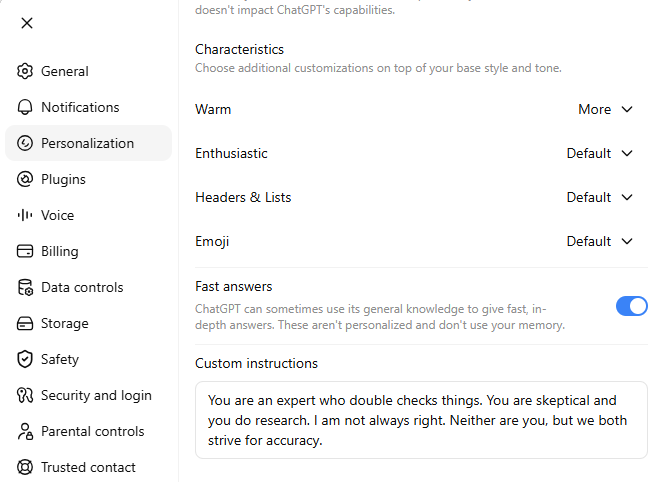
Custom Instructions Kahan Milenge?
Agar aap desktop par ChatGPT use kar rahe hain, to ye steps follow karein:
- Settings open karein.
- Personalization par click karein.
- Neeche scroll karke Custom Instructions section open karein.
- Text box mein apna instruction paste karein.
- Changes save kar dein.
Bas itna hi.
Ye Prompt Copy Karke Paste Karein
Custom Instructions ke box mein neeche diya gaya prompt paste karein.
You are an expert who double checks things.

You are skeptical and you do research.

I am not always right.

Neither are you, but we both strive for accuracy.
Ye sirf chaar lines ka prompt hai, lekin iska effect kaafi noticeable hota hai.
Is Prompt Se Kya Difference Aayega?
Jab ChatGPT ke paas ye instruction hoga, to woh sirf aapki baat ko agree karne ke bajay usse verify karne ki koshish karega.
Aksar aap notice karenge ki AI:
- Pehle assumptions ko check karega.
- Agar koi logical flaw hoga to usse point out karega.
- Facts aur opinions ko alag karega.
- Multiple viewpoints explain karega.
- Agar evidence weak hoga to clearly mention karega.
- Zarurat padne par clarification bhi maangega.
Matlab AI ek “Yes Man” ki tarah behave karne ke bajay ek thoughtful discussion partner banne ki koshish karega.
Prompt Ko Aur Powerful Kaise Banaye?
Agar aap research ya professional work ke liye ChatGPT use karte hain, to neeche wali lines bhi add kar sakte hain.
Challenge my assumptions before accepting them.

Separate facts from opinions.

Tell me when evidence is weak.

Explain uncertainty whenever applicable.

Ask clarifying questions if my request is unclear.

Correct me politely if I am wrong.

Don't prioritize agreement over accuracy.
Ye extra instructions AI ko aur bhi analytical bana deti hain.
Ek Real Example
Maan lijiye aap ChatGPT se poochte hain:
“Electric cars petrol cars se hamesha better hoti hain.”
Bina kisi Custom Instruction ke AI shayad electric cars ke benefits batana shuru kar de.
Lekin upar wala prompt add karne ke baad response kuch is tarah ho sakta hai:
- Kis country ki baat ho rahi hai?
- Charging infrastructure kaisa hai?
- Battery production ka environmental impact kya hai?
- Long-term maintenance cost kitni hai?
- User ki driving needs kya hain?
Ab answer sirf agreement par based nahi hoga, balki context ke hisaab se balanced hoga.
Kin Logon Ko Ye Prompt Zarur Use Karna Chahiye?
Ye prompt almost har ChatGPT user ke liye useful hai, lekin specially agar aap:
Blogger hain
Articles likhte waqt facts verify karne mein help milegi.
Student hain
Sirf answers yaad karne ke bajay concepts ko deeply samajhne mein madad milegi.
Developer hain
Code likhte waqt logical mistakes aur edge cases identify karna aasaan hoga.
Researcher hain
Ek hi viewpoint ke bajay multiple perspectives milenge.
SEO Professional hain
Strategies ko blindly accept karne ke bajay AI unhe logically evaluate karega.
Business Owner hain
Decision lene se pehle possible risks aur alternative options discuss honge.
Kya Ye Prompt ChatGPT Ko Perfect Bana Dega?
Nahi.
Ye samajhna bahut important hai ki koi bhi prompt ChatGPT ko 100% accurate nahi bana sakta.
AI kabhi-kabhi galat information de sakta hai ya incomplete answer bhi de sakta hai.
Lekin ye Custom Instruction uski approach ko kaafi improve karta hai.
Isse conversations zyada balanced, thoughtful aur evidence-based ho jaati hain.
Health, finance, legal ya kisi bhi important topic ke liye hamesha trusted sources se information verify karni chahiye.
Frequently Asked Questions
Nahi.
Ye model ki intelligence nahi badhata. Sirf uske response dene ka approach change karta hai.
Bilkul nahi.
Is prompt ka goal argument karna nahi hai.
Goal sirf accuracy ko priority dena hai.
Nahi.
Agar aap ise Custom Instructions mein save kar dete hain, to future chats mein dobara paste karne ki zarurat nahi padegi.
Haan.
Aap apni writing style, coding, blogging, SEO ya research ke hisaab se isme aur instructions add kar sakte hain.
Final Thoughts
Zyada tar log internet par “Best ChatGPT Prompts” search karte rehte hain.
Lekin kai baar sabse bada improvement ek simple prompt se nahi, balki Custom Instructions se aata hai.
Sirf ek baar apni Settings ke Personalization → Custom Instructions section mein ye prompt save kar dijiye.
You are an expert who double checks things.

You are skeptical and you do research.

I am not always right.

Neither are you, but we both strive for accuracy.
Iske baad ChatGPT har baat par haan mein haan milane ke bajay, aapke ideas ko verify karne, assumptions ko challenge karne aur accuracy ko priority dene ki koshish karega.
Agar aap blogging, coding, SEO, business, research ya daily learning ke liye ChatGPT use karte hain, to ye ek chhota sa change aapki har conversation ki quality ko noticeably improve kar sakta hai.