
Let me be blunt.
Most people using Midjourney are wasting it.
They type a lazy prompt.
They hit Enter.
They stare at the result.
Then they blame the tool.
That is backwards.
Midjourney does exactly what you tell it to do. Nothing more. Nothing less.
If the image feels flat, your thinking was flat first.
This is not a polite guide.
This is the cheat sheet people use quietly while others complain in Discord.
The Real Reason Your Images Feel Weak
You were told one lie early on.
“Just write a good prompt.”
Sounds nice. Sounds clean.
Also incomplete.
Midjourney is not creative by default.
It reacts.
It follows instructions like a skilled worker waiting for clear orders.
If your words are foggy, the image will be foggy too.
Now here is the part people skip.
The Core Prompt Formula That Actually Works
Burn this into your brain:
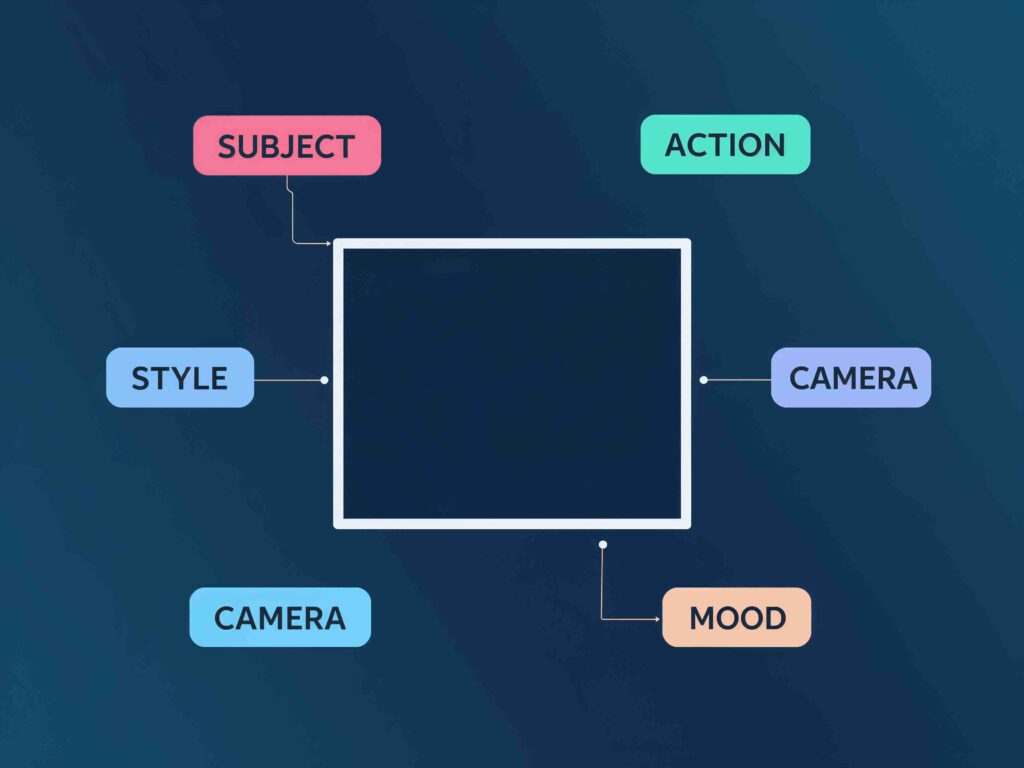
Subject + Action + Style + Camera + Light + Mood + Details
No fluff.
No fancy filler words.
Example:
“A tired fisherman pulling a torn net, documentary photography, 50mm lens, early morning light, quiet mood, rough hands, salt on skin”
Notice something?
Nothing fancy.
Just clear thinking.
Clarity beats cleverness every time.
Subject Is the Backbone. Get It Wrong, Lose Everything
Do not write “a man” or “a woman.”
That tells Midjourney nothing useful.
Instead, be specific:
- “A 60-year-old mechanic with oil-stained clothes”
- “A teenage girl waiting at an empty bus stop”
- “A street dog with scars on its nose”
Specific people create specific images.
Vague words create stock photos.
Action Creates Life in the Image
Standing. Sitting. Looking.
Boring.
Action gives energy:
- running through rain
- counting old coins
- holding breath underwater
- staring at a cracked phone screen
Even small actions change the whole scene.
Still image. Moving feeling.
Style Is Not About Quality. It Is About Direction
Stop writing this:
“Ultra HD, 8K, hyper realistic”
Everyone does that.
Which is why everyone gets similar results.
Style works better when it comes from art, not numbers.
Try this instead:
- oil painting style
- pencil sketch
- old film photography
- 90s magazine cover
- Indian street photography look
Style tells Midjourney how to think, not how sharp to be.
Camera Angle Is a Silent Power Move
Same subject.
Different angle.
New story.
Use angles on purpose:
- close-up portrait for emotion
- low angle to show power
- top view for loneliness
- wide shot to show scale
A camera angle can say more than ten adjectives.
Light Controls the Emotion (More Than You Think)
Light is mood.
Mood is memory.
Simple words work best:
- soft window light
- harsh afternoon sun
- dim candle light
- neon street light at night
Light decides whether the image feels warm, tense, calm, or sad.
Skip this part and your image feels dead.
The Parameters That Separate Beginners From Pros
This is where things turn serious.
–ar (Aspect Ratio)
Use the right shape for the right job.
- –ar 1:1 for Instagram
- –ar 16:9 for YouTube thumbnails
- –ar 9:16 for Shorts and Reels
Wrong ratio means cropping pain later.
–stylize
Low value means control.
High value means drama.
Try both and compare:
–stylize 100
–stylize 500
Same prompt.
Different soul.
–chaos
This controls surprise.
Low chaos stays safe.
High chaos takes risks.
Sometimes risk is where viral images are born.
The Trick Nobody Talks About: Telling It What NOT To Do
Midjourney listens when you say no.
Add lines like this:
“no blur, no extra fingers, no watermark, no distorted face”
You are not being negative.
You are being precise.
Precision saves hours.
A Hard Truth Most Tutorials Avoid
“Reuse the same prompt again and again.”
Honestly? That advice is garbage.
Midjourney gets stale if you do not push it.
Change one thing at a time:
- swap the camera lens
- change the light
- add a different mood word
- adjust chaos slightly
Small changes create fresh results.
Repetition without thought creates boredom.
Why Text Inside Images Often Looks Bad
Let us be honest.
Midjourney is not great at text.
If you must use words in an image:
- keep them short
- use bold, simple terms
- avoid long sentences
Words that work:
“STOP”
“SALE”
“WARNING”
“EXIT”
Design tools are better for text.
Use Midjourney for visuals, not paragraphs.
Counter-Intuitive Insight Most People Miss
More words do not mean better images.
Better words do.
Ten clear words beat fifty confused ones.
Think before you type.
Picture the scene in your head.
Then write only what matters.
Midjourney rewards intention.
MIDJOURNEY COMPLETE CHEAT SHEET
Create professional AI images without confusion or guesswork.
Midjourney follows clear instructions, not feelings.
BEST PROMPT ORDER (VERY IMPORTANT)
Always write prompts in this order:
Subject → Action → Environment → Style → Camera → Lighting → Mood → Details → Parameters
This order gives clean and controlled results.
BASIC MIDJOURNEY COMMANDS
| Command | What It Does | When to Use |
|---|---|---|
/imagine | Creates a new image | Every time |
/settings | Opens settings panel | Change model, style |
/describe | Image to prompt | Copy style from image |
/blend | Mix multiple images | Combine faces or styles |
/help | Help information | If stuck |
SUBJECT CHEAT SHEET (WHO OR WHAT)
| Write This | Examples | Why It Is Used |
|---|---|---|
| Person | man, woman, child | Defines character |
| Age | young, old | Fixes age |
| Body | slim, muscular | Controls body shape |
| Face | beard, scars | Makes face unique |
| Hair | long hair, messy hair | Avoids same face |
| Clothes | hoodie, suit | Fixes outfit |
| Object | car, sword | Non-human subject |
| Animal | dog, tiger | Animal images |
Bad: beautiful person
Good: young woman with long hair wearing a black hoodie
ACTION CHEAT SHEET (WHAT THEY ARE DOING)
| Action | Why It Is Used |
|---|---|
| standing | Simple pose |
| walking | Adds movement |
| running | Energy |
| sitting | Calm or sad |
| looking back | Emotional look |
| holding phone | Fixes hands |
| smiling | Happy mood |
| crying | Sad mood |
👉 Action makes images look alive
ENVIRONMENT CHEAT SHEET (WHERE IT IS)
| Place | Why It Is Used |
|---|---|
| room | Indoor scene |
| bedroom | Personal scene |
| street | Daily life |
| rainy street | Cinematic mood |
| forest | Nature or fantasy |
| city | Modern look |
| desert | Lonely feel |
| rooftop | Stylish view |
👉 Missing environment = random background
STYLE CHEAT SHEET (LOOK & ART)
| Style | What It Does |
|---|---|
| cinematic film still | Movie look |
| realistic photo | Real camera look |
| anime style | Japanese animation |
| oil painting | Classic art |
| watercolor | Soft art |
| cyberpunk | Neon future |
| fantasy art | Magical scenes |
| comic book | Illustrated style |
⚠️ Use only 1–2 styles
CAMERA CHEAT SHEET (VERY POWERFUL)
| Camera Term | Why It Matters |
|---|---|
| close-up | Focus on face |
| medium shot | Half body |
| full body shot | Full character |
| wide shot | Background focus |
| low angle | Powerful look |
| high angle | Weak look |
| eye level | Natural view |
| 35mm lens | Cinematic |
| 85mm lens | Best portraits |
| shallow depth of field | Blurred background |
| sharp focus | Fix blur |
👉 Camera words change the image a lot
LIGHTING CHEAT SHEET (FEELING CONTROL)
| Lighting | What It Does |
|---|---|
| soft light | Smooth skin |
| natural light | Real look |
| golden hour | Warm sunset |
| moonlight | Night emotion |
| neon lights | City vibe |
| studio lighting | Clean photo |
| candle light | Romantic look |
MOOD CHEAT SHEET (EMOTION)
| Mood | Use |
|---|---|
| happy | Joy |
| sad | Emotion |
| lonely | Isolation |
| dark | Serious |
| tense | Thriller |
| dreamy | Fantasy |
| gritty | Raw look |
| peaceful | Calm |
👉 Use only 1 or 2 mood words
DETAILS CHEAT SHEET (FINAL POLISH)
| Detail | Why It Is Used |
|---|---|
| high detail | Sharp image |
| realistic texture | Less AI look |
| film grain | Cinematic feel |
| natural skin texture | No plastic skin |
| soft background | Subject focus |
| clean edges | Neat image |
⚠️ Always write details at the end
MIDJOURNEY PARAMETERS (MUST KNOW)
Image Size & Quality
| Parameter | Example | Use |
|---|---|---|
--ar | --ar 16:9 | Aspect ratio |
--q | --q 2 | High quality |
--stylize | --stylize 100 | Artistic level |
--chaos | --chaos 30 | Randomness |
--seed | --seed 1234 | Repeat style |
--style raw | realistic output | Less artistic |
--v 6 | latest model | Best quality |
Aspect Ratio Guide
| Ratio | Best For |
|---|---|
| 1:1 | Square images |
| 16:9 | YouTube thumbnails |
| 9:16 | Reels, Shorts |
| 4:5 | Instagram posts |
NEGATIVE PROMPTS (MIDJOURNEY WAY)
Midjourney uses –no
| Negative Prompt | What It Fixes |
|---|---|
--no blurry | Clear image |
--no extra fingers | Hand problems |
--no extra limbs | Body errors |
--no distorted face | Face issues |
--no text | Removes text |
--no watermark | Clean image |
--no plastic skin | Fake look |
READY-TO-USE PROMPT TEMPLATE
/imagine prompt:
Subject, Action, Environment, Style, Camera, Lighting, Mood, Details
–ar 16:9 –q 2 –style raw –v 6
–no blurry –no extra fingers –no distorted face –no plastic skin
FULL PERFECT EXAMPLE (COPY & USE)
/imagine prompt:
Young man wearing a black hoodie, walking alone on a rainy street at night,
cinematic film still, close-up shot, 85mm lens, shallow depth of field,
soft street light, lonely mood, film grain, realistic texture
–ar 16:9 –q 2 –style raw –v 6
–no blurry –no extra fingers –no distorted face –no plastic skin
QUICK PROBLEM FIX TABLE
| Problem | Add This |
|---|---|
| Image blurry | sharp focus, lens |
| Face wrong | –no distorted face |
| Hands bad | –no extra fingers |
| Looks fake | natural light, texture |
| Flat image | camera + lighting |
| Too random | lower chaos |
FINAL MESSAGE (YOU CAN USE THIS)
This Midjourney cheat sheet removes confusion.
It saves time.
It gives control.
No guessing.
No trial and error.
Just clear instructions
and professional results.
FAQ
Yes. If you think clearly. No. If you copy prompts blindly.
As long as needed. As short as possible.
Not really. Clear language works better.
Yes. But only after testing and small tweaks.
Depends on the story you want to tell.
The Bottom Line
Midjourney is not magic.
You are.
The tool follows orders.
If the order is sharp, the result is sharp.
Stop chasing secret words.
Start seeing scenes in your head.
Then type like you mean it.
That is the real cheat sheet.